
Turn an idea into a clear, usable prompt without struggling with what to say.
The CR SoftStack Prompt Builder guides you step-by-step, enabling you to create better AI prompts in seconds, even if you’re new to AI.
What is an AI Prompt Builder?
An AI prompt builder helps you turn unclear ideas into structured prompts that AI tools like ChatGPT can understand and respond to accurately.
Most people struggle with AI because they don’t know how to ask the right question. A prompt builder removes that guesswork by guiding you step-by-step.
The CR Prompt Builder is designed specifically for beginners, helping you create better prompts without needing technical knowledge.

Who This Tool Is For?
This builder is perfect for:
Beginners learning how to talk to AI
Professionals who want clearer results from tools like ChatGPT
Creators and entrepreneurs using AI for ideas, writing, and planning
Anyone tired of vague or confusing AI responses
Bad Prompt vs Better Prompt
Bad Prompt
Good Prompt
Help me with my resume
Explanation
I am a mid-career professional transitioning into project management. Create a resume that highlights transferable skills, leadership experience, and measurable results.
The difference isn’t the tool—it’s how you ask.
The CR Prompt Builder helps you structure prompts so AI gives you useful, actionable answers.
What the CR Prompt Builder Helps You Do
The CR Prompt Builder helps you turn an idea into a clear, structured prompt so AI can respond more accurately and usefully
Instead of guessing what to ask or how to phrase it, you’re guided step by step, so your prompt is clearer from the start.
How to Use the Prompt Builder
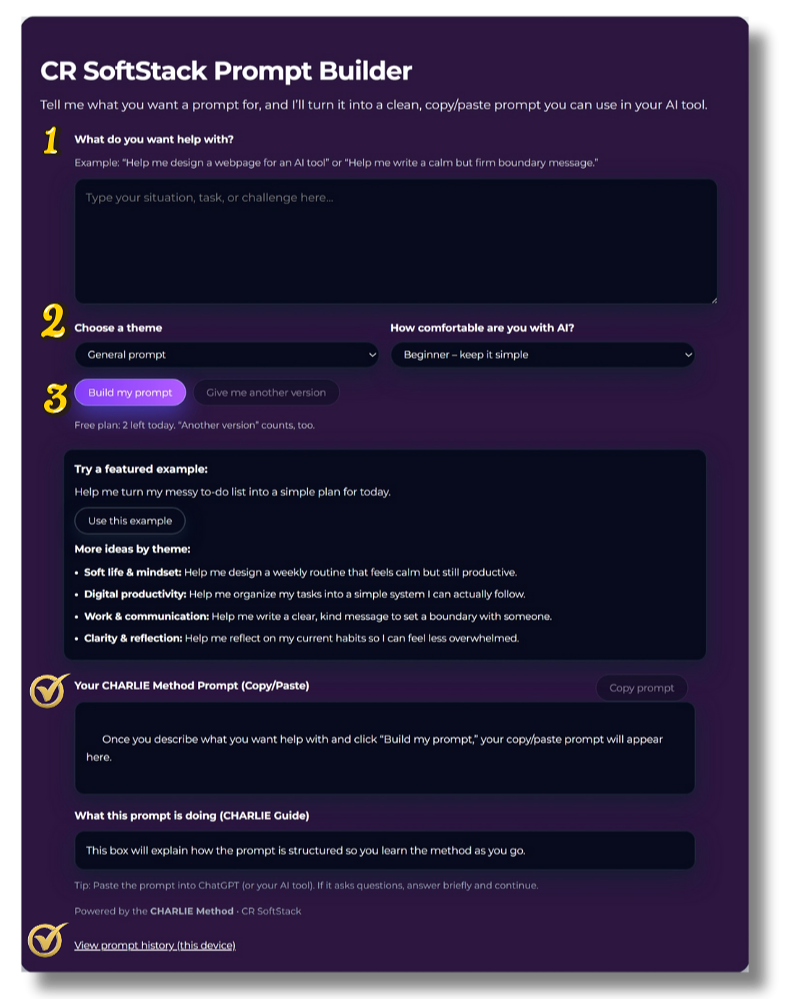
This section stays simple and reassuring. No jargon. No mechanics.

Want to revisit something you’ve already built?
Use View prompt history (this device) at the bottom of the page.
How it works (in under 60 seconds)
Step 1 — Describe your situation Type a short sentence about what you want a prompt for. Messy is okay.
Step 2 — Choose your comfort level Select Beginner, Intermediate, or Expert, so the prompt meets you where you are.
Step 3 — Build your prompt. Click Build my prompt to generate a clear, ready-to-use prompt. Your prompt will appear in the Your CHARLIE Method Prompt (Copy/Paste) section
You don’t need to get it perfect. The builder helps you clarify it.
Want a different take?
Click Give me another version to see an alternative prompt.
Are you happy with the prompt?
Copy prompt and insert prompt into an AI tool of your choice.
The prompt will trigger clarifying questions to ensure a quality response is provided to you
Respond to those clarifying questions
Seconds later ….
Why the CHARLIE Method works
How Most People Use AI
People often treat AI like a search engine.
They type a short question and hope for the best.
The result is usually vague or incomplete.
How the CHARLIE Method Works
It helps you:
Clarify what you actually want
Structure the request for better results
Guide the AI toward useful responses
Instead of guessing what to ask, the builder walks you through the process.
Example prompt:
"Write something about productivity."
Access the CR Prompt Builder
Explore the CR SoftStack Prompt Builder at your own pace and experience how a guided structure can transform the results you get from AI.
Recommended“Their attention to detail and commitment to quality truly stood out. We’ve already recommended them to others.”
– Former Customer
Get In Touch
If you're interested in working with us, complete the form with a few details about your project. We'll review your message and get back to you within 48 hours.